Monday, September 12, 2016

Switch Port Security Configuration


Switch>
Switch>enable
Switch#conf t
Switch(config)#interface fastEthernet 0/1

Switch(config-if)#switchport mode access
 //Need to configure switch port as access port. By default switch port in dynamic port. So you can’t configure port security. It will show “Command rejected: FastEthernet0/1 is a dynamic port.”


Switch(config-if)#switchport port-security
//After configure port as access port. Configure Enable port security by above command.

Switch(config-if)#switchport port-security mac-address 0001.423C.CAD5
//statically configures Allowed MAC address for switchport. Only this port allow on this port.

Switch(config-if)#switchport port-security maximum 2
// If you want to all more device, you can specify the number.

Switch(config-if)#switchport port-security mac-address sticky
//Allow Switch to dynamically learn second MAC address with above command.

Now See Switch Learn MAC address Dynamically:

Switch#show port address
                                    Secure Mac Address Table
-------------------------------------------------------------------------------
Vlan    Mac Address   Type                            Ports                Remaining Age
                                                                                                (mins)
----       -----------          ----                               -----                  -------------
1          0001.423C.CAD5       SecureConfigured       FastEthernet0/1                       -
1          0060.3E4B.3453         SecureSticky               FastEthernet0/1                       -
------------------------------------------------------------------------------
Total Addresses in System (excluding one mac per port)     : 1
Max Addresses limit in System (excluding one mac per port) : 1024


Switch(config-if)#switchport port-security violation shutdown
//Port will be shutdown after third Device/MAC come.

Now see the port status by below command:

Switch#show port-security interface fastEthernet 0/1
Port Security              : Enabled

Port Status                : Secure-up
Violation Mode             : Shutdown
Aging Time                 : 0 mins
Aging Type                 : Absolute
SecureStatic Address Aging : Disabled
Maximum MAC Addresses      : 2

Total MAC Addresses        : 2

Configured MAC Addresses   : 1

Sticky MAC Addresses       : 1

Last Source Address:Vlan   : 0060.3E4B.3453:1
Security Violation Count   : 0

Now See the Port on Shutdown for connect third Device/MAC:
Switch#show port-security
Secure Port MaxSecureAddr CurrentAddr SecurityViolation Security Action
               (Count)       (Count)        (Count)
--------------------------------------------------------------------
        Fa0/1        2          2                 1         Shutdown
----------------------------------------------------------------------
Switch#

Saturday, September 10, 2016

OSI Reference Model


OSI Model: OSI Stands for Open Systems Interconnect. Which is define how multiple device or different manufacturing device connect with each other. OSI Model Developed by ISO (International Organization for Standardization). OSI Model define 7 layers for communication.


SL
Layer Number
Layer Name
1
Layer 7
Application
2
Layer 6
Presentation
3
Layer 5
Session
4
Layer 4
Transport
5
Layer 3
Network
6
Layer 2
Data Link
7
Layer 1
Physical

Application Layer: Application Layer provides interface between User Interface and Network. Like an web page come to user for access. Application Layer Protocol is Telnet, FTP, HTTP etc.

Presentation Layer: Presentation Layer Controls data formatting and syntax. If Receiving Device not Understand Receiving Device Data. Then Presentation layer control the data conversation. Sometimes Presentation Layer encrypt and compress the data.

Session Layer: Session Layer is responsible for establishing, Maintaining and Terminating the sessions between devices. If session broken, this layer try to recover the session.

Transport Layer: Transport Layer responsible for data transfer. It's may be TCP or UDP. TCP is Connection-oriented and UDP is Connection less.
Connection-oriented protocols provide several important services: Segmentation and sequencing, Connection Establishment, Acknowledgement and Flow control

Network layer: Network Layer responsible for transporting data between networks. Network Layer major responsibilities is Logical Addressing and Routing. Network Layer Protocol is IP and IPX.

Data Link layer: Data Link Layer is responsible for transporting data within a network.

Physical layer: Physical Layer control the signaling and transferring of raw bits into physical medium.


Defination of some Networking Words.


Network: Simply Network means connections between two or more device.

Computer Network: Connection Between Computers or Network Devices for Service and Resource Sharing. Like Email, Music, Web, Printer etc.

Protocol: Protocol is a set of rules. Protocols Define how different manufacturing devices connect with each other.

Topology: Topology Defines how the device are connect (logical and Physical) with each other. Example Bus, Star, Ring, Mesh and Hybrid topology.

LAN: LAN stands for Local Area Network. Generally A Small Network within a building, Usually under the administrative control of a single organization.

WAN: WAN Stands for Wide Area Network. Generally Larger Network than LAN. Where a WAN Traffic traverse from Private to Public Network or vice versa. Which means it will be connected over a multiple WAN technology. Usually under the multiple Administrative control of multiple organization.

VPN: VPN Stands for Virtual Private Network. Generally VPN Connect Remote Area LAN over public network.

VLAN: VLAN stands for Vitrual Local Area Network. A VLAN logically segregate a LAN. Four Department in four VLAN in Single Switch can't communicate with each other without a L3 Device.


Sunday, August 21, 2016

Redirect Switch and Router command output in txt or doc file.

Redirect Switch/Router Command Output to txt or doc file:

If you want your command output store in a doc file like running configuration. You can use redirect command to store your command output in doc. Also need tftp server (download link:http://tftpd32.jounin.net/tftpd32_download.html) open. After this command you search output file on directory.

Switch>enable

Switch#show version | redirect tftp://1.1.1.1/ver.doc
Switch#exit

NTP Client Configue in Switch and Router


Configure NTP Client:

To keep switch and router time same with network. Need to configure the router and switches as NTP Clients.  If not use this command service timestamps log datetime localtime then switch generated log time show its internal clock time.

SW#conf t
SW(config)# ntp server 1.1.1.1                                                                        //NTP Server IP Address
SW(config)# clock timezone UTC +6                                                              //Set Timezone.
SW(config)# service timestamps log datetime localtime                 //Use NTP time during log generate.
SW(config)# do wr                                                                                          //save
SW(config)# end                                                                                              //exit
Switch#show ntp status                                                                                    //Check NTP Clients details
Clock is synchronized, stratum 4, reference is 1.1.1.1
nominal freq is 119.2092 Hz, actual freq is 119.2073 Hz, precision is 2**18
reference time is DB63F174.195C7E08 (15:23:00.099 UTC Sun Aug 21 2016)
clock offset is 11.9068 msec, root delay is 63.71 msec
root dispersion is 99.37 msec, peer dispersion is 9.66 msec

Switch#show clock detail
15:28:59.782 UTC Sun Aug 21 2016
Time source is NTP
Switch#
ail

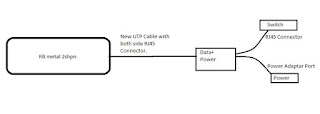
Configure rb metal 2shpn As Access Point

Turn On rb Metal 2shpn Router as like : Connect rb metal 2shpn with your Laptop by winbox. Open Winbox: Click on Neighbors you w...